Animmix: How It's Made?
Why I built an animation toolkit for 3ds Max, what went into it, and what building it taught me about making tools for other people.
The Animmix tool started out of frustration more than anything else. I have been animating in 3ds Max for over a decade at this point, and there was an efficiency missing in 3ds Max; the timeline often felt a little clunky. Maya, for example, has tools like AnimBot, and I used to think, why does it have to be so hard? Looking at MotionBuilder's layer system feels natural, responsive, and fluid, but that's not the case for 3ds Max, at least not out of the box.
I started using AnimBot for a while and realized how much more fun animation could be. I wanted to bring that feeling to Max. So I started simple, building tools that I personally wanted to use and bringing some of that MotionBuilder feeling into Max.
Starting with the Tween Machine
With that, I started categorising tools based on urgency and difficulty of execution, beginning with a Tween Machine. The concept was to create a single slider that could transition between two anchor keyframes, acting as a blend.
The idea eventually evolved from using a single slider into having multiple types of systems that could be managed, such as tweening, space offsetting, blending, simplifying curves, favoring one side of a pose over the other, smoothing, and adding noise. All of it could be handled through a single slider.
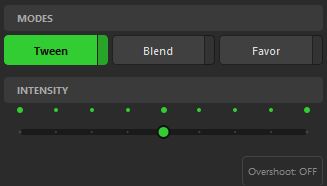
After that, I added a button that allows curves and animation to overshoot when needed.
Tangents
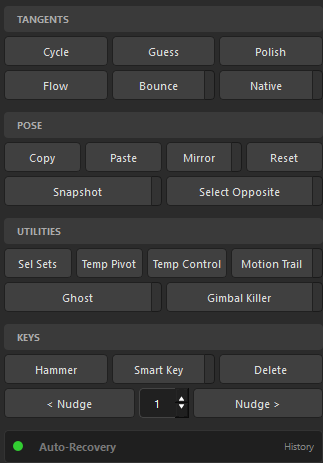
From there, I moved on to importing the native tangents from the Curve Editor into the tool. These included smooth, linear, stepped, fast, slow, and auto tangents.
After some experimentation, I also began adding new tangents, such as combining fast and slow tangents to create bounce behaviors. This allowed switching between bouncing in and bouncing out. I also developed a more advanced version of Auto Tangent called "Guess," which attempts to approximate the intention of the curve and adjust itself accordingly. Other tangents are still currently in the experimentation phase.
Alongside these, I created tools that assist with various parts of animation, particularly breakdown creation and curve editing. These tools also help with transitioning from one type of animation to another.
Reducing the number of clicks
Each feature was designed with animators in mind. The goal was to reduce the number of clicks required and ultimately save time.
From there, I started adding additional features that I felt were necessary, such as integrating 3ds Max's ghost feature while modifying it slightly. This included adding a custom motion trail with the ability to customise range, shape, and style. Other tools included an Euler filter or "gimbal killer" inspired by MotionBuilder, selection sets, temporary pivot points, hammering keys, nudging keys left and right with adjustable nudge values, and many more.
The most important tool
However, the most important tool was inspired directly by AnimBot: the recovery tool. This feature allows users to recover lost animation data (up to 15 minutes), solving a very common issue with 3D animation software crashing.
What I learned
I learned a lot from making Animmix. I learned that tools should always be made with people in mind: clarity, consistency, UI, and UX are critical. Animators should not have to change the way they work in order to use a tool.
Animmix is my way of making 3ds Max better for animators. I want animators to focus on their craft, and Animmix is my way of helping them do that.
Animmix is free and available on GitHub. See the tool page or go straight to the repository.
References
Hindash, R. (2026, March 3). Animmix: How It's Made? Rashed Hindash. https://rashedhindash.github.io/documentation/animmix-how-its-made/