Animmix
A modern animation workflow toolkit for 3ds Max 2026+. Snapshot-based pose tools for character animation, with support for complex rigs.

Animate your way.
Animmix is an animation workflow toolkit for 3ds Max 2026 and later. It brings the kind of animation tooling Maya users take for granted into Max: pose snapshots, mirroring, and non-destructive pose work, built for character animation on complex rigs.
Get it
The tool lives on GitHub. Download it from there, along with every previous release:
- github.com/RashedHindash/ANIMMIX, the repository
- Releases, where 1.2 is current
Installation takes about a minute. See Installation.
The interface
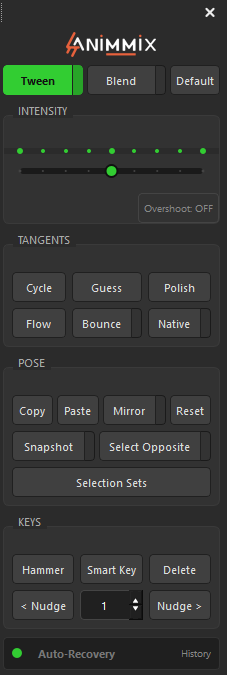
The panel is organised into four working groups:
- Tween / Blend / Default, with an intensity slider and an overshoot toggle
- Tangents: Cycle, Guess, Polish, Flow, Bounce, Native
- Pose: Copy, Paste, Mirror, Reset, Snapshot, Select Opposite, Selection Sets
- Keys: Hammer, Smart Key, Delete, and nudge controls
Auto-recovery runs underneath, with a history you can step back through.
How it works
Animmix is built around snapshots. You select your animation controllers, take a named snapshot of the current pose, and that stored state becomes something you can recall, compare against, or restore later.
That matters for two reasons. It means pose work is non-destructive, so you can push a pose hard knowing the previous state is retrievable, and it's what the rest of the tools build on, since they operate against saved pose states rather than editing blind.
What it supports today
Animmix is a work in progress and is still evolving through iterative testing.
- Supported: standard bone-based rigs, and custom rig setups
- Not yet supported: CAT and Biped rigs
CAT and Biped rely on internal animation systems that need specialised handling. Support is planned for a future release, once the core feature set is finalised and stable.
work. Animmix validates this during its Setup Check. See Getting started.